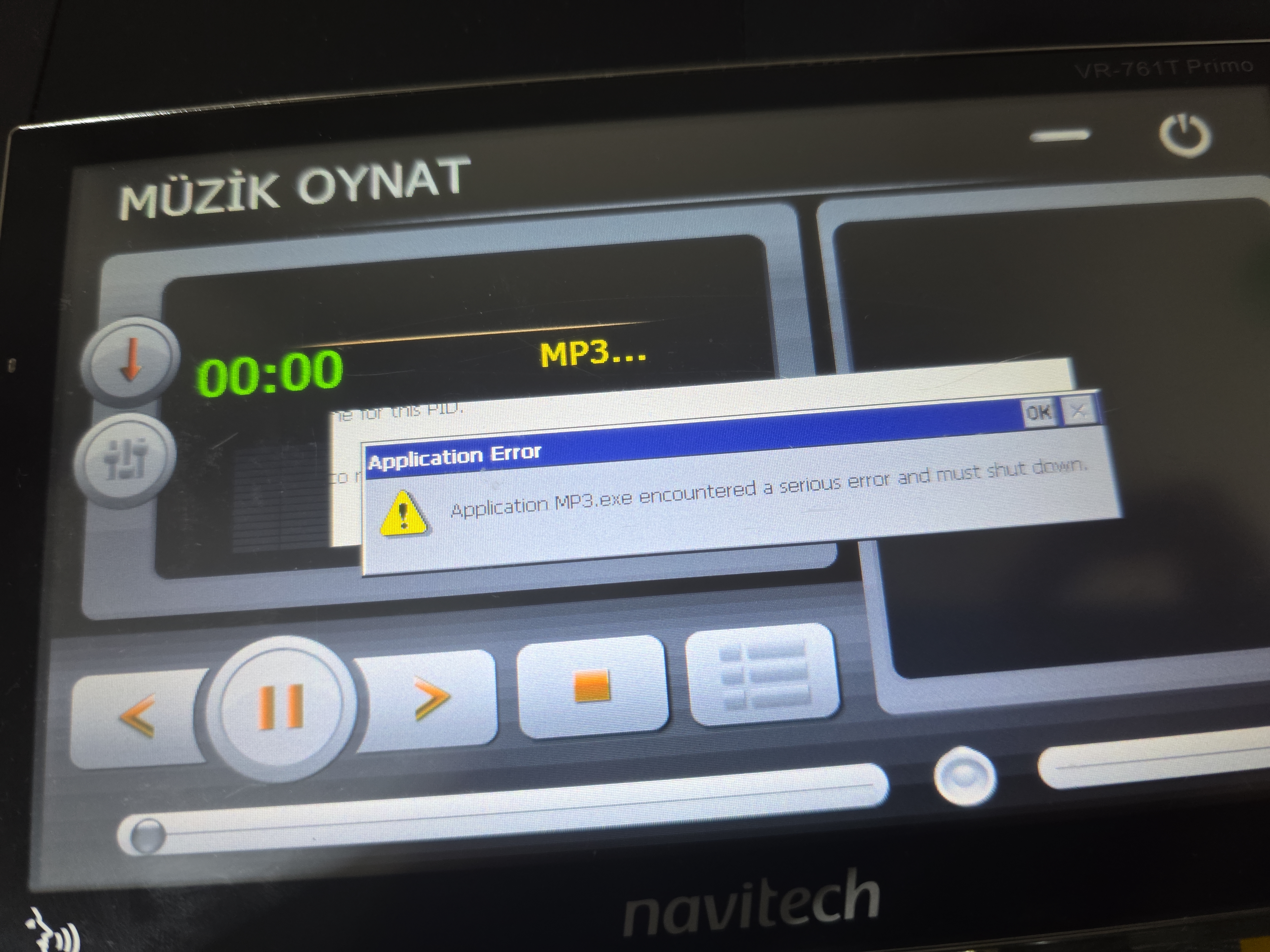
Navitech VR-761T Primo: a controlled native Windows CE GUI test
I investigated a Navitech VR-761T Primo PND and got a small, native ARM Windows CE application to open from its existing TV App tile. The stock navigation software, OS and boot path still run. This is an application-slot substitution on my own device, not a kernel exploit, a bootloader unlock or a full custom firmware. The original TV executable is preserved, although a full restore has not yet been exercised.
Device and visible hardware
[list]
[*]Bezel: VR-761T Primo. The About screen identifies Navitech Navigation System 9.6.13.267029 and 6 Nov 2012 (Fig. 1).
[*]The opened PCB photo clearly reads SiRFatlasV AT551, Realtek ALC5625 and Micron D9LXN (Fig. 2). A 2014 copy of Micron's FBGA marking table maps D9LXN to MT47H64M16HW-3 IT:H. Micron identifies the MT47H64M16HW family as 1 Gbit, 64M ×16 DDR2 SDRAM, nominally 128 MiB. This chip is RAM, not the NAND. New close-ups show a separate leaded Micron package marked 29F32G08CB... (Figs. 15–16). In Micron's 16/32/64Gb NAND part-number chart, `29F` means NAND, `32G` means 32 Gbit, and `08` means an 8-bit data interface. That implies roughly 4 GiB nominal raw capacity for this family, before spare/OOB and bad-block handling. The rest of the top marking cannot yet be decoded with confidence into a complete orderable part number; precise voltage, revision, ECC requirement and geometry remain unverified.
[*]Other board evidence includes PF09R silkscreen; read-only ROM/platform strings include PF09R.4820 and AT10X0BD. These are useful matching clues, not proof of a safe cross-device firmware image. The official Navitech model listing advertises a 7-inch 800×480 display, 128 MB RAM, 4 GB storage, SiRF Atlas-5, iGO Primo 2.4 and Mini USB. Its figures are marketing/model specifications, while the chip photo and OS queries concern this particular unit.
[*]There is a USB sync/client connector, a USB-A port and a removable card slot (Fig. 3). I did not establish a UART/JTAG pinout. Background adapters in the photos were not evidence of an electrical debug connection.
[*]On-device queries report Windows CE 6.0, ARM architecture/type values 5 / 2577, 117,904 KiB (115.14 MiB) OS-visible RAM, and 800×480 display. The DDR2 part identification makes a nominal 128 MiB physical RAM chip plausible and consistent with the model listing; the roughly 12.9 MiB difference is not a measured reservation map. The diagnostic GUI reports mounted capacities of 3,720 MiB ResidentFlash and 149 MiB ResidentFlash2 (Fig. 9). These are filesystem capacities, not a raw NAND measurement.
[/list]
Fig. 1 — VR-761T Primo and original navigation software About screen.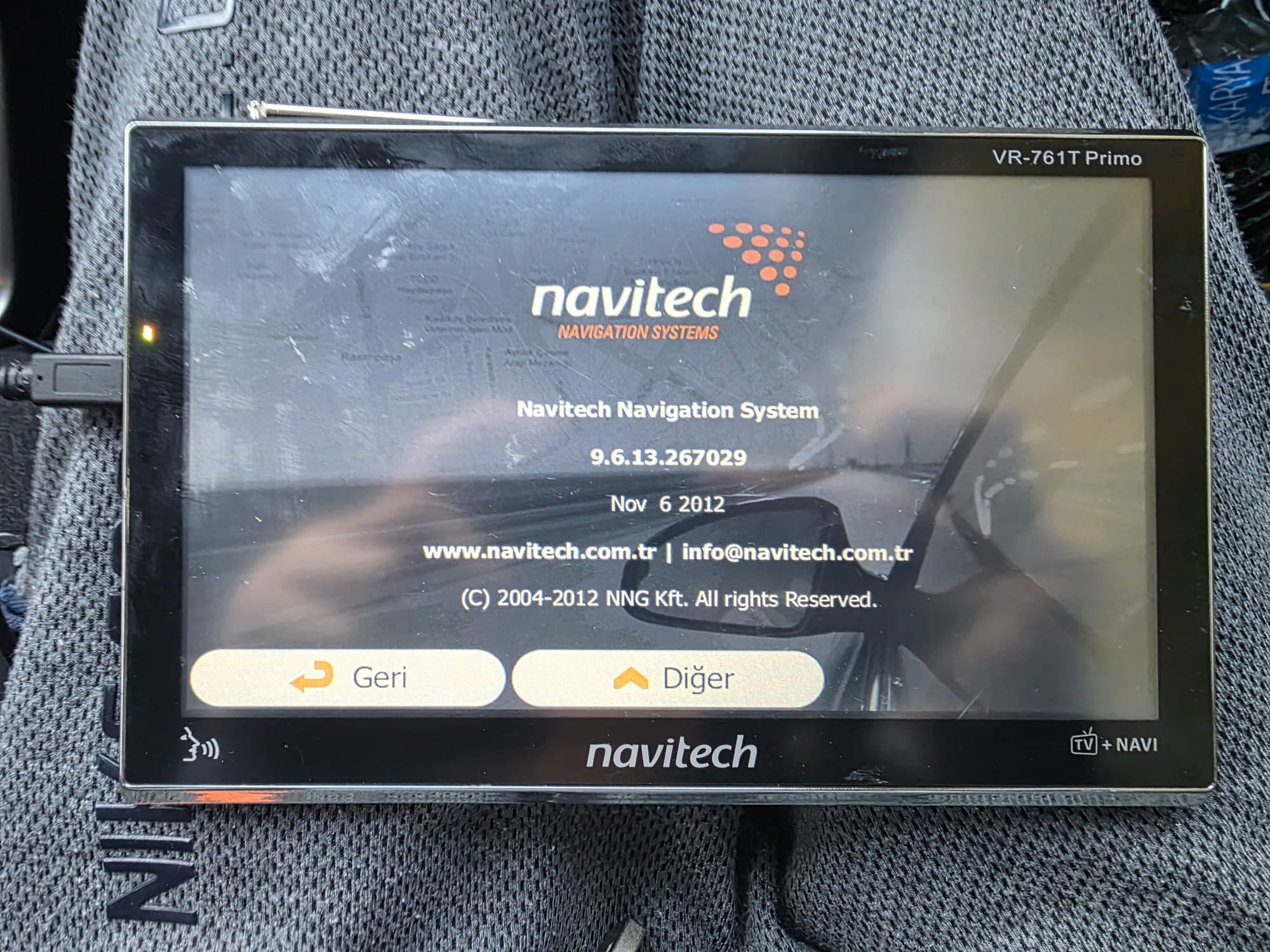
Fig. 2 — AT551, ALC5625 and D9LXN markings. D9LXN maps to 1 Gbit DDR2 RAM; the separate NAND is shown in Figs. 15–16.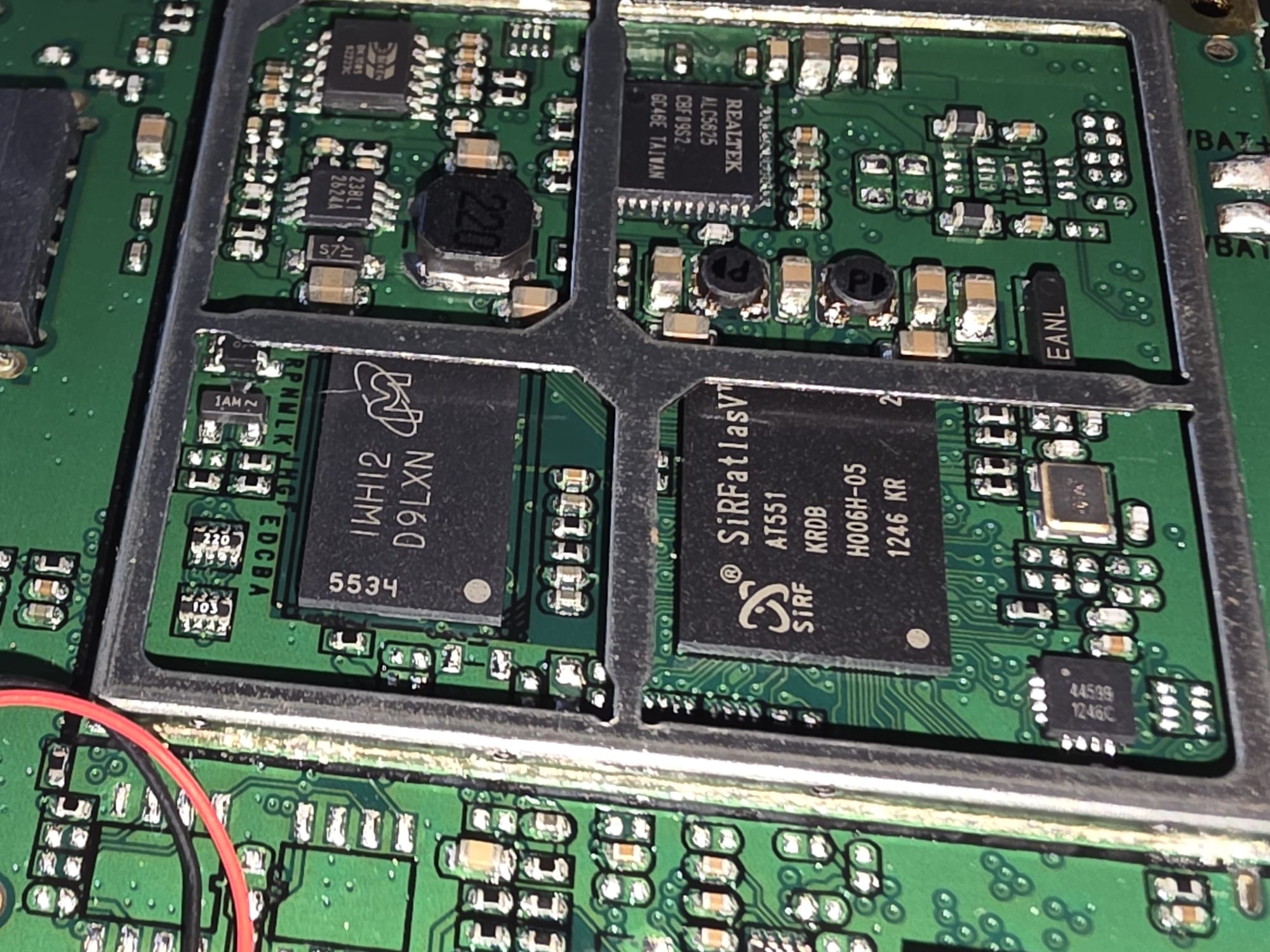
Fig. 3 — Visible connectors. The USB sync connector is in use; USB-A and the card-slot edge are also visible.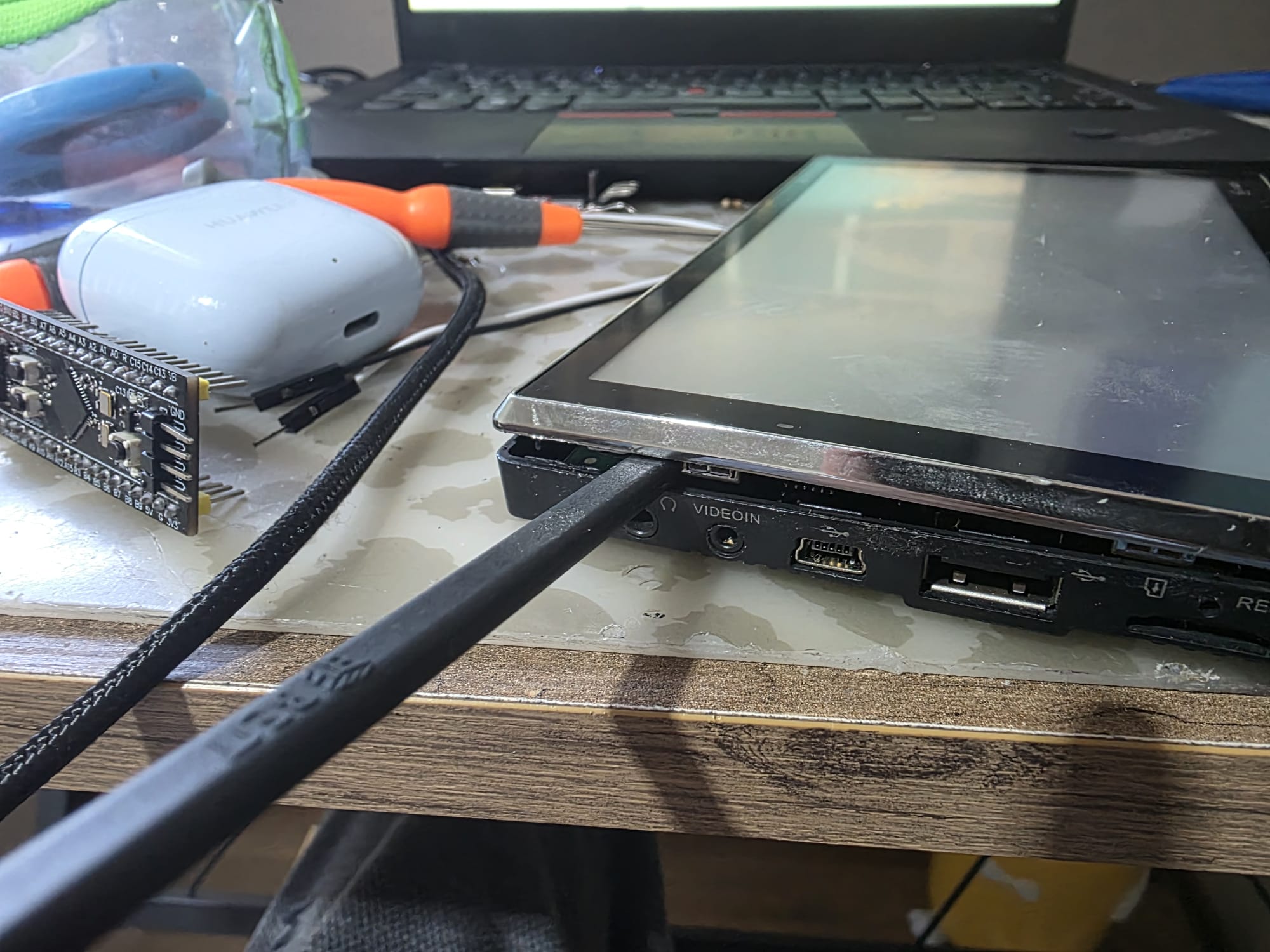
Software hierarchy and backup
The two accessible persistent volumes are \ResidentFlash (navigation files) and \ResidentFlash2 (YFAPP applications).
iGO Primo runs as \ResidentFlash\NNG\NNGNAVI.EXE. Local static analysis found a reference to /ResidentFlash2/YFAPP/ATV/atv.exe and a UI start_tv() action.
Tapping the TV tile originally opened a color-bar TV UI (Fig. 7). The YFAPP36/YuanFeng association is supported by a DLL version resource and other software strings;
it does not prove that YuanFeng designed this PCB or sold this Navitech unit.
Fig. 4 — Application/access hierarchy. Solid arrows are observed device behavior; dashed arrows are configuration/static evidence.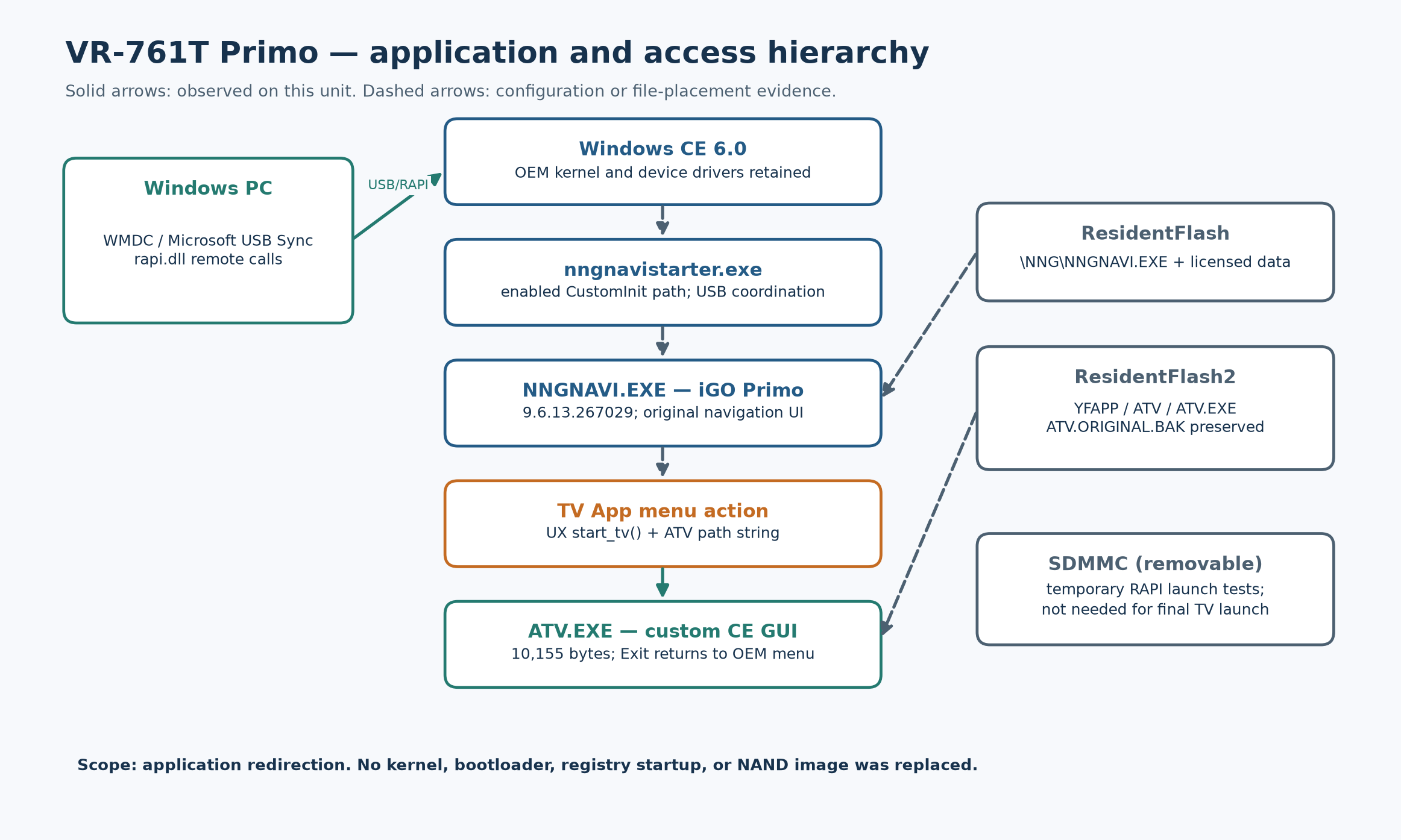
Before any on-device program test, I used Microsoft USB Sync / Windows Mobile Device Center and its desktop RAPI interface to copy both mounted persistent volumes. 173/173 files from ResidentFlash and 106/106 files from ResidentFlash2 were copied with local SHA-256 verification. The broader read-only inventory/copy includes 466 files; 309 attempted OS/root reads were inaccessible or failed, including locked registry hives. The live GPS parameter files changed during acquisition, so this is not an atomic snapshot. This is emphatically a filesystem backup, not a complete NAND image or proven firmware recovery image. Bootloader, hidden partitions, ECC/OOB, bad-block map and some ROM/locked data are not preserved.
What RAPI did here
The PC screenshots show USB VID:PID 045E:00CE, manufacturer string SiRF Technology Inc., product string SiRF GPS HH, USB 2.0 High-Speed, host driver WinUSB.sys and WCEUSBS setup class. The USB vendor-ID owner/driver label does not identify the maker of every chip on the PCB. Windows Mobile Device Center reports connected and PC Explorer exposes a PND namespace containing `\`, `Network`, `ResidentFlash` and `ResidentFlash2`. It is not an ordinary Windows drive letter, and the PC Explorer window is not proof that the device has a visible file-manager screen. The raw USB viewer screenshot contains a unique device serial; the raw WMDC screenshot contains a personal PC account name, so I am describing them without publishing those images.
RAPI (Remote API) lets a desktop program call supported CE operations through this active sync connection. The actual sequence was CeRapiInitEx → CeFindAllFiles → read-only CeCreateFile/CeReadFile → host-side SHA-256. After separate approval, CeCreateProcess launched a card-resident test EXE; the later TV-slot operation used guarded writes and CeMoveFile. RAPI is an OS service: it needs CE to be running and is not a USB ROM download/recovery protocol.
There is a subtle storage trap in the PC screenshot: Explorer labels the CE root `\` as only 2.25 MiB total, 2.20 MiB free. Independent `CeGetStoreInformation` returned 2,359,296 bytes total and 2,314,240 free, which matches that display. This is the small CE root object store, not the entire 4 GB-class persistent storage. The separate mounted ResidentFlash/ResidentFlash2 volumes have the much larger capacities measured by the on-device `GetDiskFreeSpaceEx` diagnostic. An attempted desktop RAPI disk-space wrapper returned error 120, so its zeros were not treated as true sizes; the local CE API later succeeded. Older Microsoft CE documentation also distinguishes the object store from installable flash file systems.
The first small GUI loaded and drew, but the OEM USB transfer application covered it (Fig. 5). Closing that OEM screen briefly exposed the GUI and then the unit restarted. A second diagnostic GUI made one `SetWindowPos(HWND_TOPMOST)` request and one `SetForegroundWindow` request. Both returned accepted on this unit; it stayed visible over the transfer screen while RAPI remained connected, and its Exit button worked (Fig. 8). A larger read-only information GUI then worked as well (Fig. 9). These observations establish on-device execution and GDI rendering for the tested native CE ARM binaries; they do not establish full firmware control.
Fig. 5 — OEM USB transfer screen, which initially covered the simple app.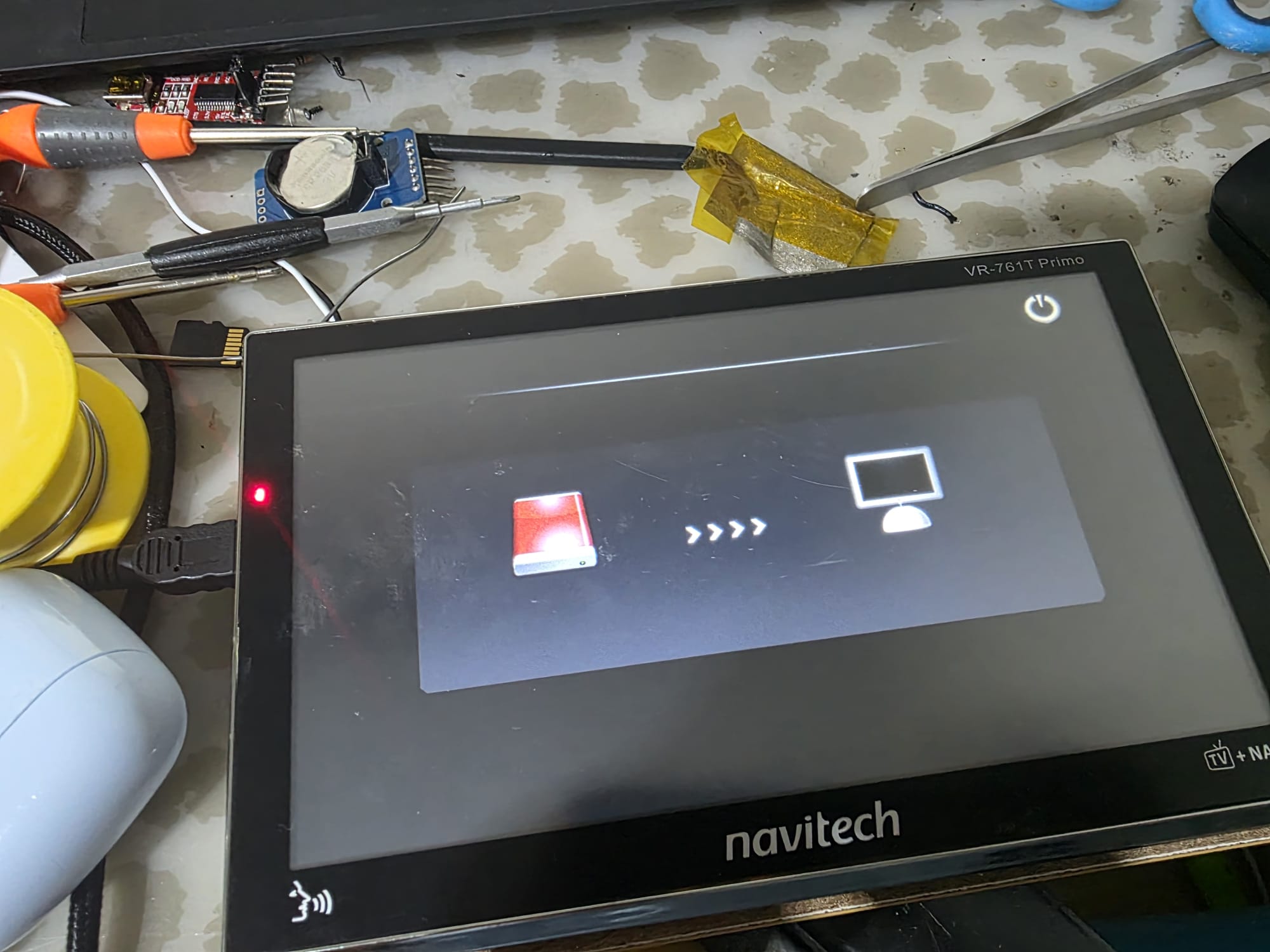
Fig. 6 — Test sequence and verification gates.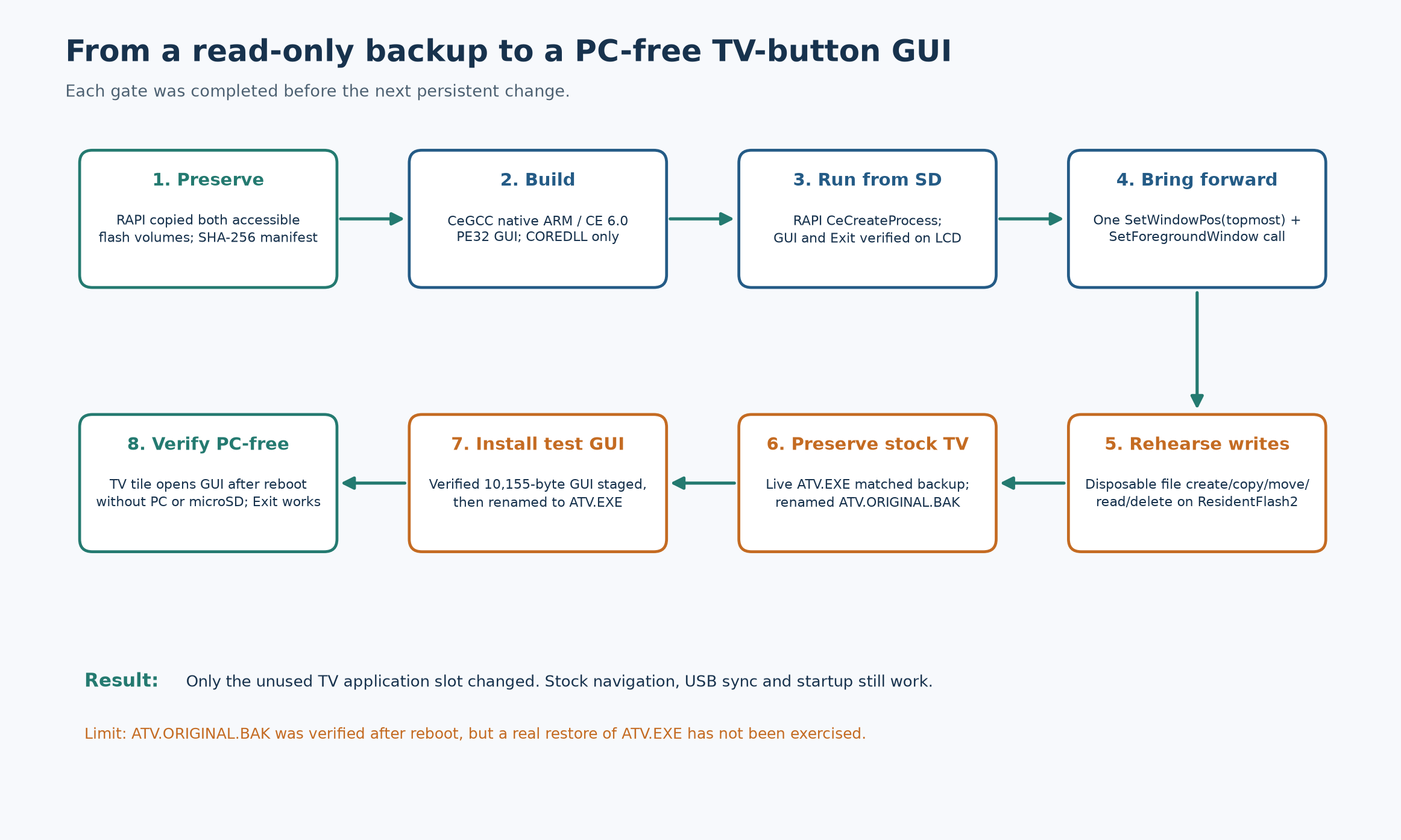
Fig. 7 — Original TV App output before the change.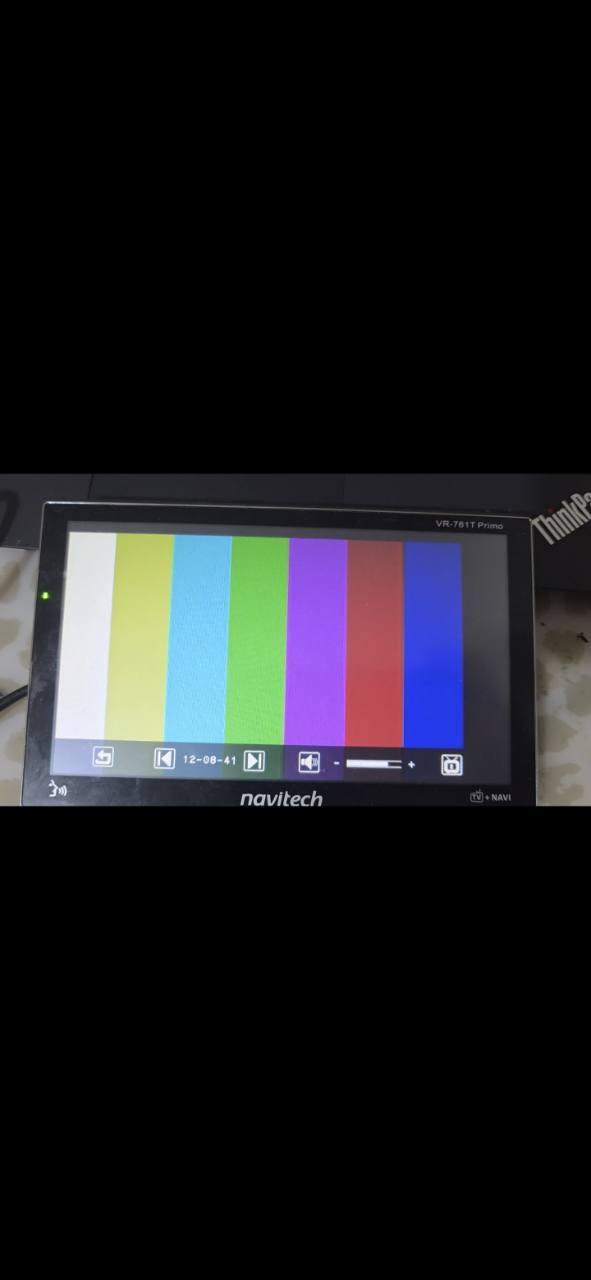
Fig. 8 — Native visibility test over the USB screen; both window requests reported accepted. Photo is sideways as originally taken.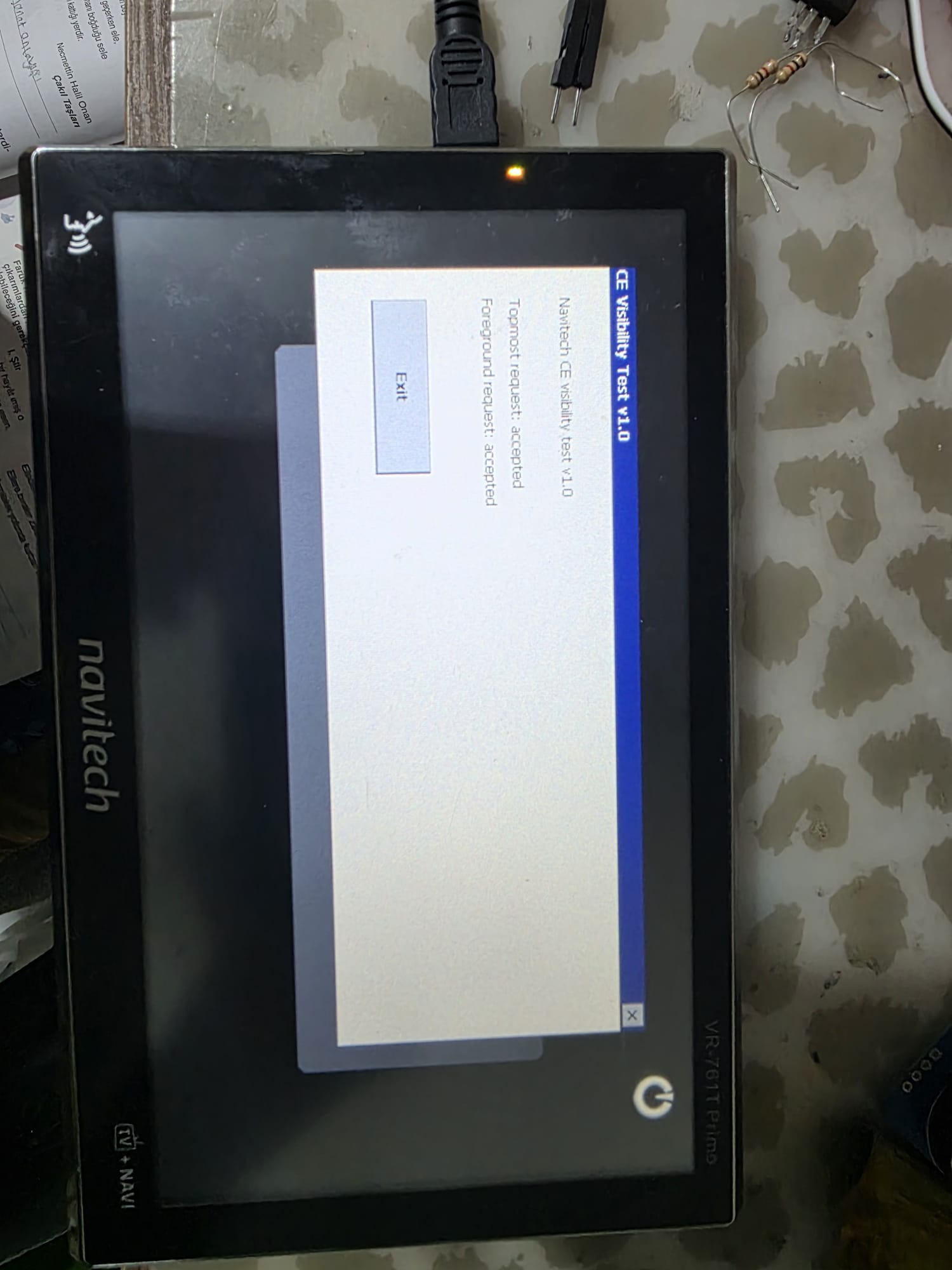
Fig. 9 — Read-only Windows CE information GUI running on the real device.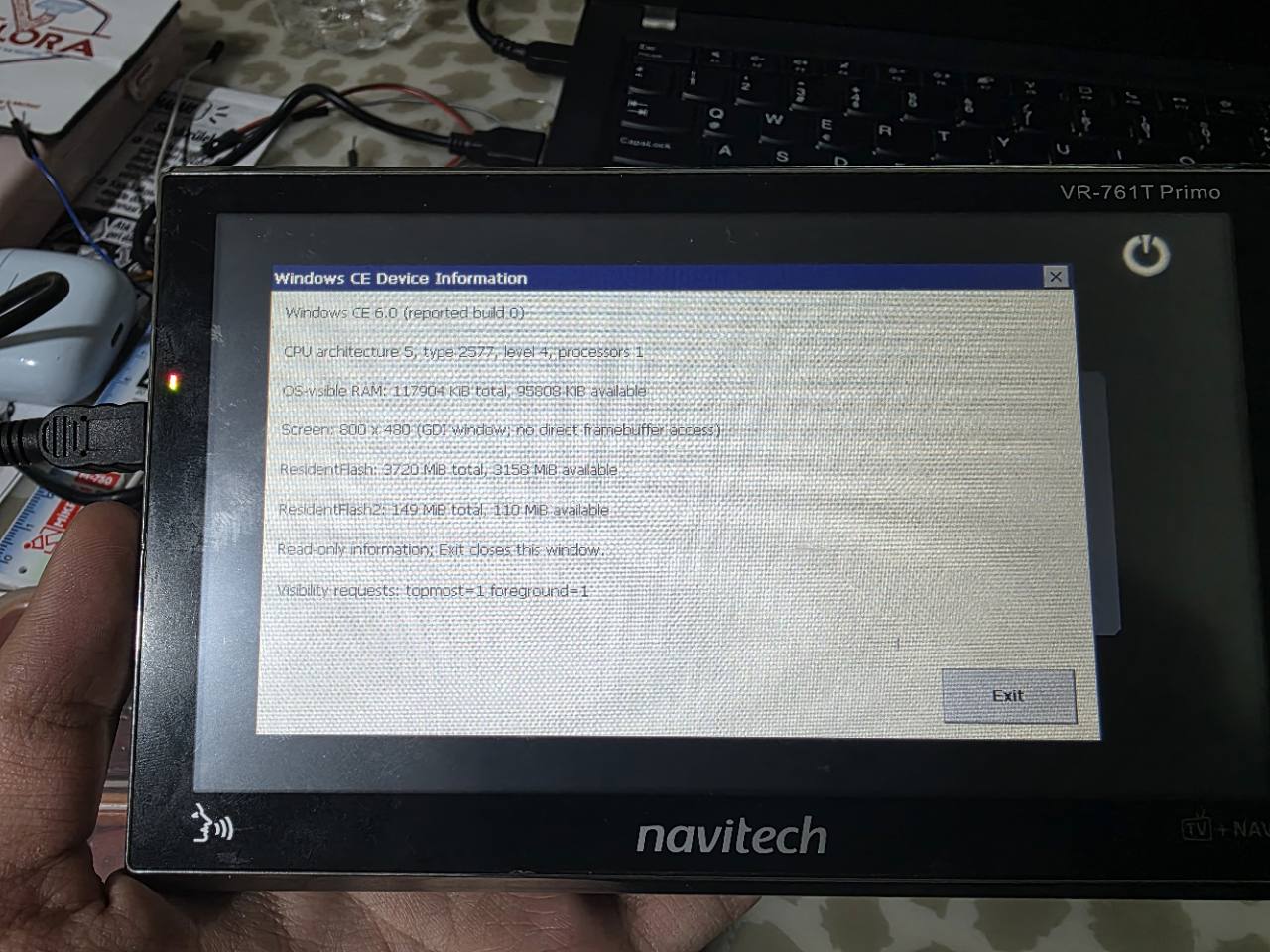
PC-free TV App launch
The final test GUI was built with the historical CeGCC 0.59.1 arm-mingw32ce toolchain using ARMv4T instructions for a CE 6.0 GUI PE. Static validation found PE32 ARM machine `0x01C0`, CE GUI subsystem `9`, OS/subsystem version `6.0`, and only `COREDLL.dll` imports. The 10,155-byte binary contains an Exit button and a playful BarbaroR4 / TeamOBM message; its own code does not write files or registry values. Before changing the slot, the same binary was launched from microSD through RAPI and visually verified.
With explicit owner approval, I verified the live \ResidentFlash2\YFAPP\ATV\ATV.EXE against the private backup, tested disposable file operations in that directory, renamed the stock executable to ATV.ORIGINAL.BAK, staged the new binary as ATV.EXE, and read both back by RAPI. The original was 149,504 bytes, SHA-256
e525bb2c5463a11f2c360dcf3b7a0e9ce5cdd58c1f2a5ddded7fbae8fab877ed
The custom EXE is 10,155 bytes, SHA-256
6a515b670f977fb5a3045b8e53c13d42911f99dde506aa9e57e051fc4f8f33fb
After unplugging the PC, the TV tile opened the custom GUI and Exit returned to the OEM menu (Figs. 10–11). A normal power cycle without the microSD card still loaded the original navigation interface; the TV tile still opened our GUI and Exit still returned normally. ActiveSync reconnected afterward. The backup and both live TV-slot file hashes were rechecked after reboot. The actual restoration of stock `ATV.EXE` from `ATV.ORIGINAL.BAK` remains untested; I am not calling this a fully proven recovery path.
Fig. 10 — Stylus on the OEM TV App tile, used for PC-free launch.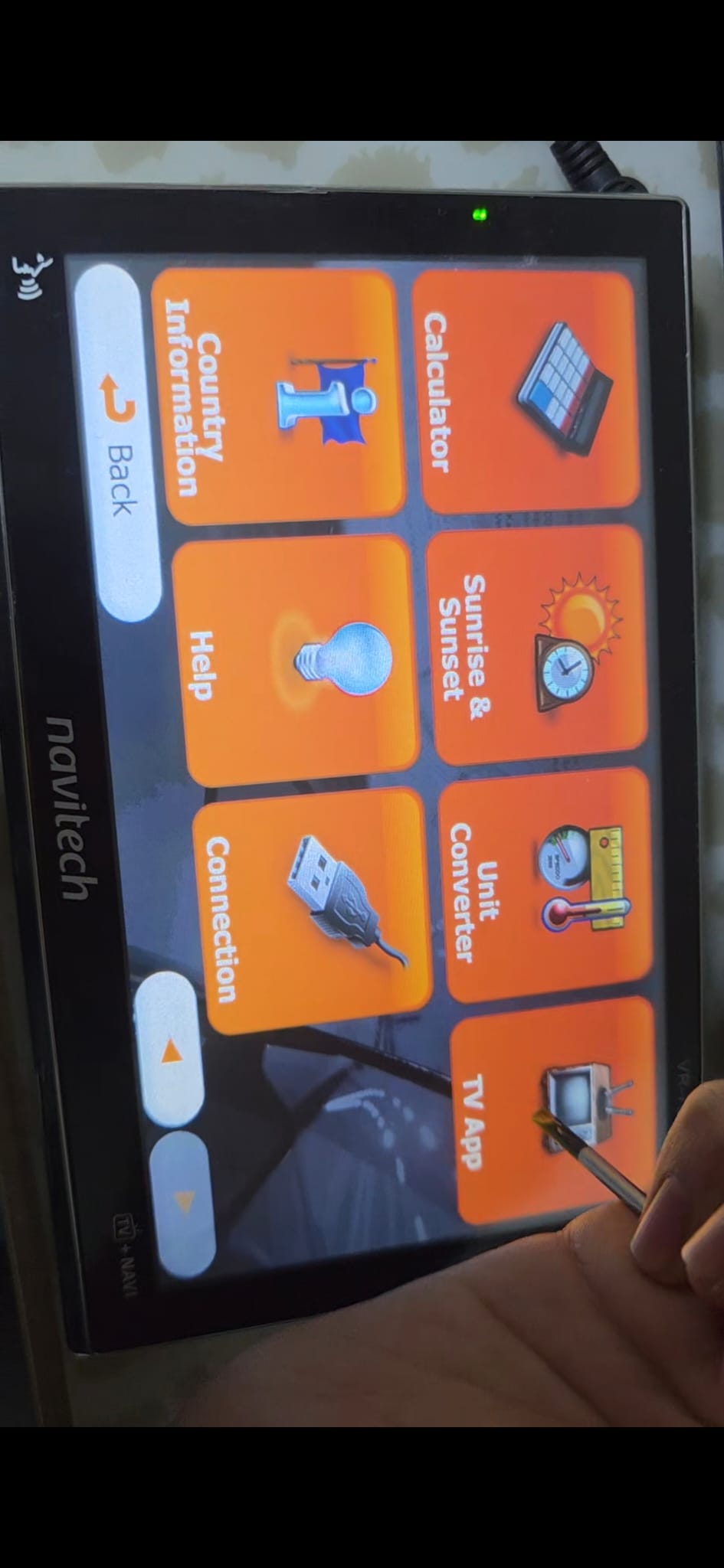
Fig. 11 — Custom CE GUI with Exit over the normal OEM interface. Photo is sideways as originally taken.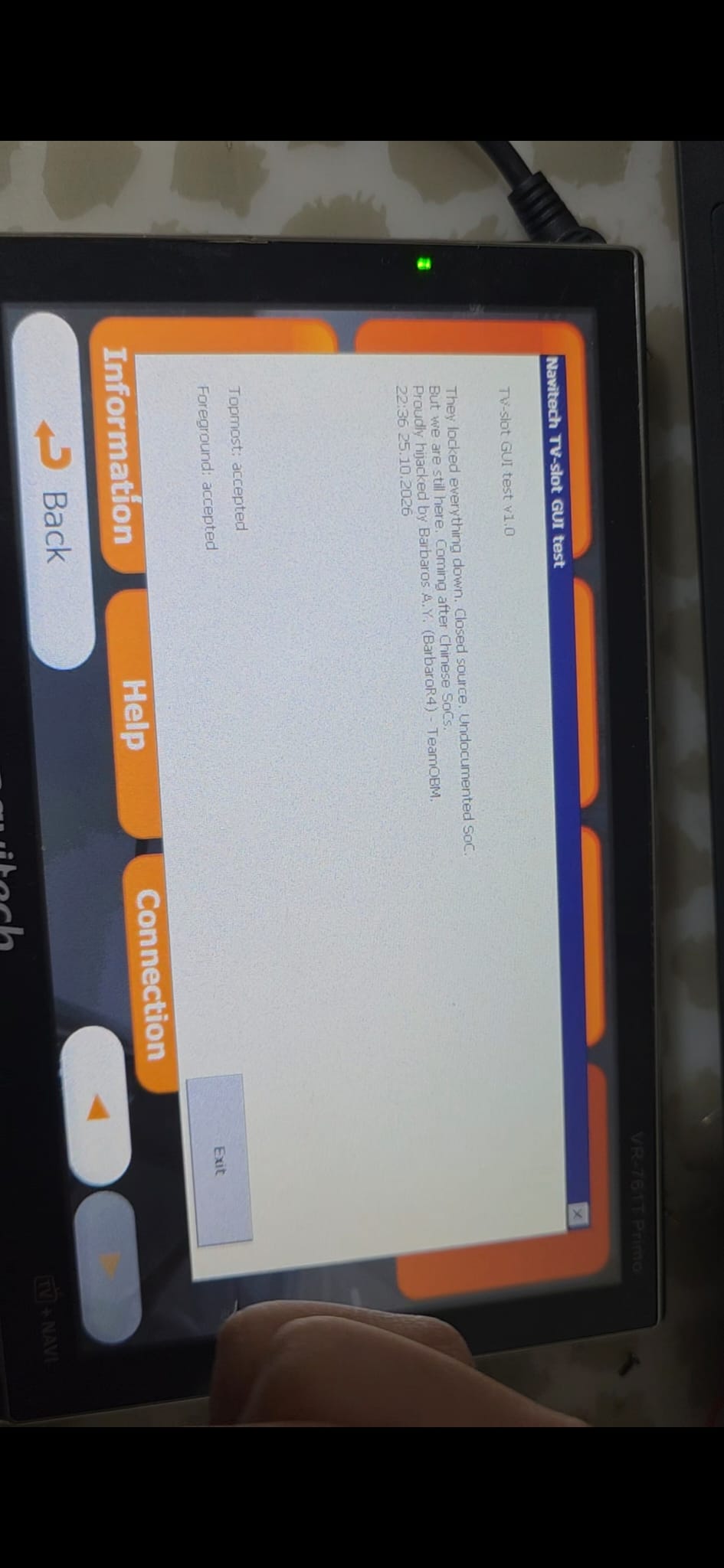
What the copied files and registry actually reveal
The safe PC screenshot of `PND > ResidentFlash` shows the `NNG` directory and four `gpspara` files (Fig. 12). The screenshot rounds each to 70.0 KB. The copied originals measure 71,700 bytes each; the four hashes differ and the first little-endian word is 71,692, exactly file length minus eight. Two files changed while the backup was running, so subsequent stable versions were separately retained. Their internal format and restore semantics remain unknown. I would not exchange these files between units.
Fig. 12 — PC-side Explorer view of ResidentFlash, with NNG and gpspara0–3. It is a sync namespace view, not the device's own file manager.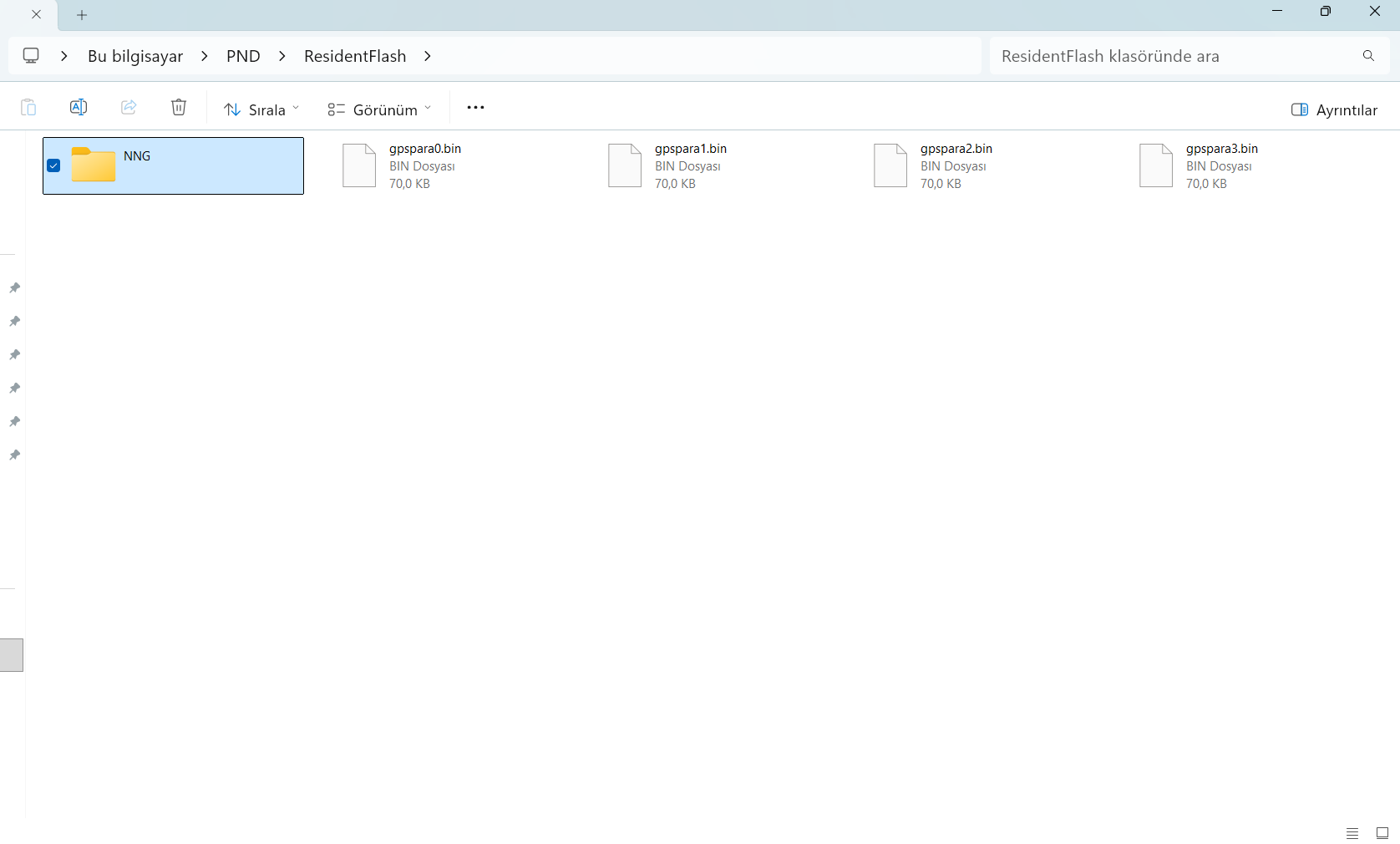
An abbreviated tree from the verified local copies is:
\ResidentFlash\NNG\NNGNAVI.EXE       iGO Primo / DELCO UI
\ResidentFlash\NNG\SYS.TXT           device_type=Delco_VR_761T
\ResidentFlash\NNG\DATA.ZIP          UI + device profile
\ResidentFlash\gpspara[0..3].bin     changing, opaque data
\ResidentFlash2\YFAPP\nngnavistarter.exe
\ResidentFlash2\YFAPP\ATV\ATV.EXE   TV tile target
\ResidentFlash2\YFAPP\System\       USB, power and OEM components
\ResidentFlash2\YFAPP\Player\       multimedia components
The backed-up `DATA.ZIP` profile names 800×480, `sdcard_name=sdmmc`, GPS port 1 at 57,600 baud and TV integration. A DELCO Lua UI action calls `start_tv()`; `NNGNAVI.EXE` contains a fixed ATV path. These are static clues, while the before/after TV-tile photographs are the runtime proof of this particular launch path. The very small `nngnavistarter.exe` is not merely a path selector: its strings and ARM control flow reference the fixed NNG program, `UsbConnect.exe`, `USBConnectEvent` and `USBDisconnectEvent`. It appears to coordinate navigation and USB transitions. The exact CE ordinal calls and all runtime process relationships remain unresolved, so replacing the starter would be a very different experiment.
Read-only `HKLM\Init` included `Launch109=YFLoad6_Custom.exe`; an enabled `CustomInit` entry names the YFAPP starter, while a card-based NNG entry was disabled. Those values were observed, never changed. The `YFAPP36` DLL resource says YuanFeng and other software paths agree, but that establishes software provenance rather than PCB manufacturer. The exact process drawing the primary OEM menu has not been traced.
The same registry snapshot reports a display profile for 16-bit RGB565 and an ALC5625-oriented audio driver. GPS configuration presents `GPS.Dll` as COM7, then `commux.dll` as COM1; the iGO profile selects COM1/57,600. That is a configured route, not a captured NMEA stream or a verified GPS receiver silicon ID. Touch calibration exists in the registry, but the touch controller and physical interface were not identified. ARM type 2577 is an OS-reported processor value, not a measured clock or full CPU core identification.
Storage layout and the missing recovery image
Fig. 13 separates photographed physical parts from CE mount names.
The two mounted capacities add to 3,869 MiB. That is smaller than the NAND family's nominal 4 GiB, but the difference must not be assigned to a bootloader, hidden partition or bad blocks without a raw map.
A filesystem copy lacks page spare/OOB bytes, ECC, bad-block markers, partition offsets, ROM/bootloader content and locked in-use registry hives. In CE 6.0, `\Windows\explorer.exe` appeared as a ROM module, and
Microsoft's CeCreateFile documentation explains why a ROM `MODULES` entry is not necessarily readable as a regular file.
An Explorer process launch over RAPI returned a PID, but the OEM USB screen still covered it; I have not demonstrated a usable on-device Explorer window.
Fig. 13 — Physical RAM/NAND versus CE object store, mounted volumes and backup boundary. The NAND family marking is photographed; exact chip suffix and raw layout remain open.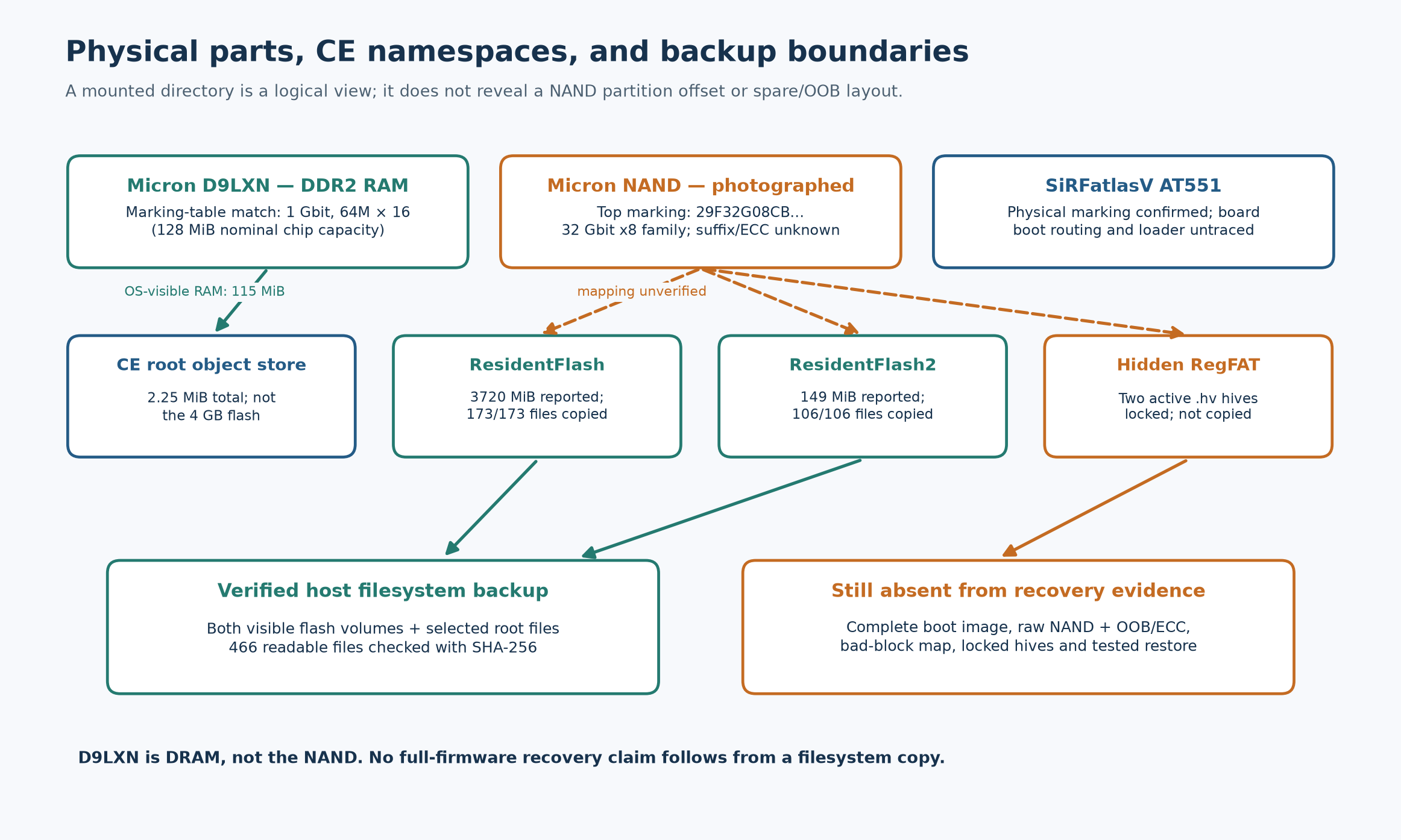
USB sync is an operating-system path, not a boot path
Fig. 14 puts the transport layers in order. The host USB descriptor and Windows binding establish how WMDC reached the running device. RAPI then issued CE API calls. `CeCreateProcess` started the owner-approved test binary from `\SDMMC`; Windows CE's window manager decided whether it was visible. The OEM `UsbConnect.exe` window initially obscured it. The later app's SetWindowPos topmost request and SetForegroundWindow request both succeeded on this device. This explains the on-screen behavior without implying a change to the display driver or firmware. A process-creation success alone would not have proven a visible window; the photographs and Exit tests are essential.
Fig. 14 — USB device → Windows driver/WMDC → RAPI → CE process → LCD window order. Each box represents a different layer of evidence.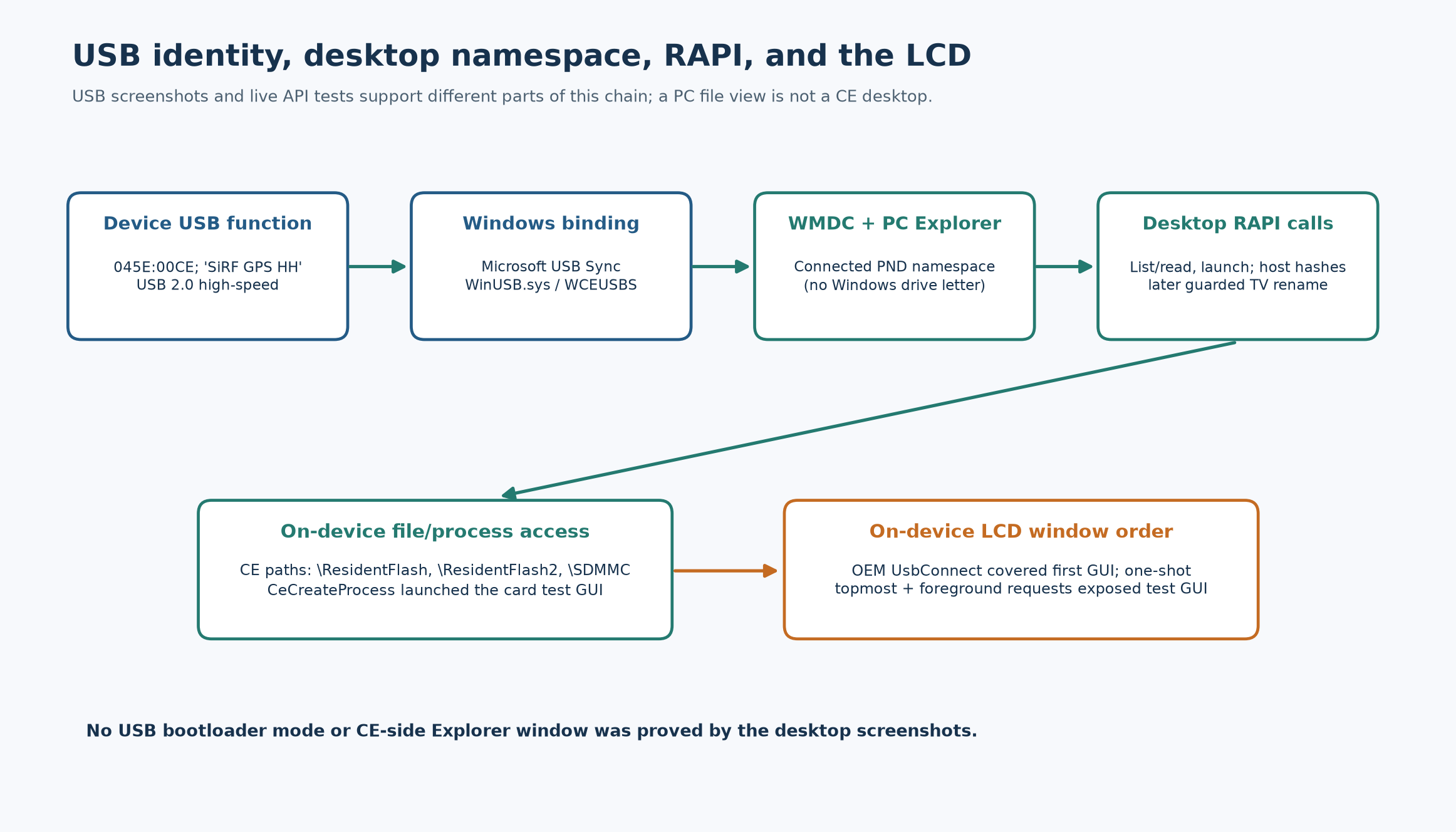
The USB-A FAT32 stick was connected, but an executable launch path from it was not established; the tested microSD played media. The supplied OEM media apps did not expose a general EXE launcher. A root-level `YFAutoRun.inf` card-insertion trial did nothing observable; it was removed afterward. The Settings UI exposed no navigation path selector. Those negative observations explain why the successful PC-free route used the existing TV App tile after the smaller removable-storage tests. They do not establish that every possible SD autorun mechanism has been ruled out.
Native binary reproducibility
The host-only build is reproducible from the preserved `custom_app/tv_slot_gui_ce.c` and `custom_app/build_tv_slot_gui.ps1`. It uses the `arm-mingw32ce` target of CeGCC, ARMv4T ARM-state instructions, `-D_WIN32_WCE=0x0600`, a GUI entry point and `-lcoredll6`. The script checks the historical compiler and Cygwin runtime paths locally, normalizes the PE timestamp and runs static validation. The target binary does not import the host Cygwin DLLs or a CeGCC Unix compatibility library: its import table contains `COREDLL.dll` only. The relevant distinction is between DLLs used to run the cross-compiler on Windows and DLLs imported by the CE executable on the device. Build repeatability and PE inspection were checked on the host, then actual launch, rendering and Exit were confirmed by the owner on the LCD.
powershell -NoProfile -File custom_app\build_tv_slot_gui.ps1
python custom_app\validate_tv_slot_gui.py
# Expected: PE32 ARM 0x01C0, CE GUI subsystem 9,
# CE 6.0 fields, COREDLL.dll-only imports,
# 10155 bytes, SHA-256 6a515b670f977fb5a3045b8e53c13d42911f99dde506aa9e57e051fc4f8f33fb
Figs. 15–16 show the NAND itself from two angles. The first also shows a separate SiRF-marked receiver package and a nearby long HK-marked component; their full identities and functions were not verified from these photographs. The visible leads support a leaded NAND package, but the full Micron ordering suffix is still not established. Reading an ONFI parameter page or NAND ID through a trusted read-only path could narrow geometry and feature set later; no such read was performed here. A raw acquisition also needs the controller's ECC and bad-block conventions before it can be considered restorable.
Fig. 15 — New top-down NAND close-up: Micron logo and `29F32G08CB...` marking on a separate package beside the SiRF receiver. The exact trailing characters are not transcribed as a complete part number.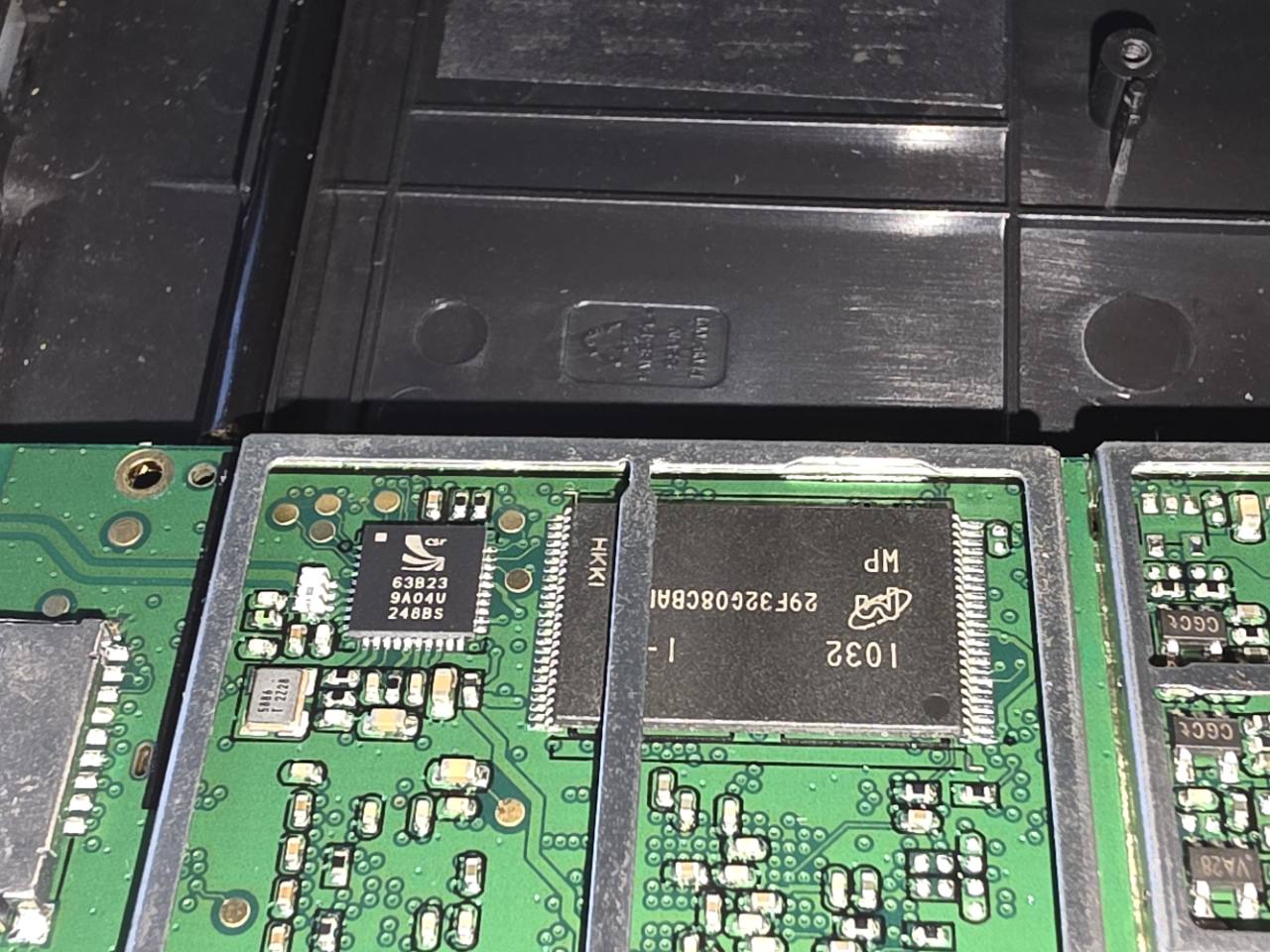
Fig. 16 — Oblique view of the same NAND package and its visible edge leads. No electrical probing or chip removal was performed.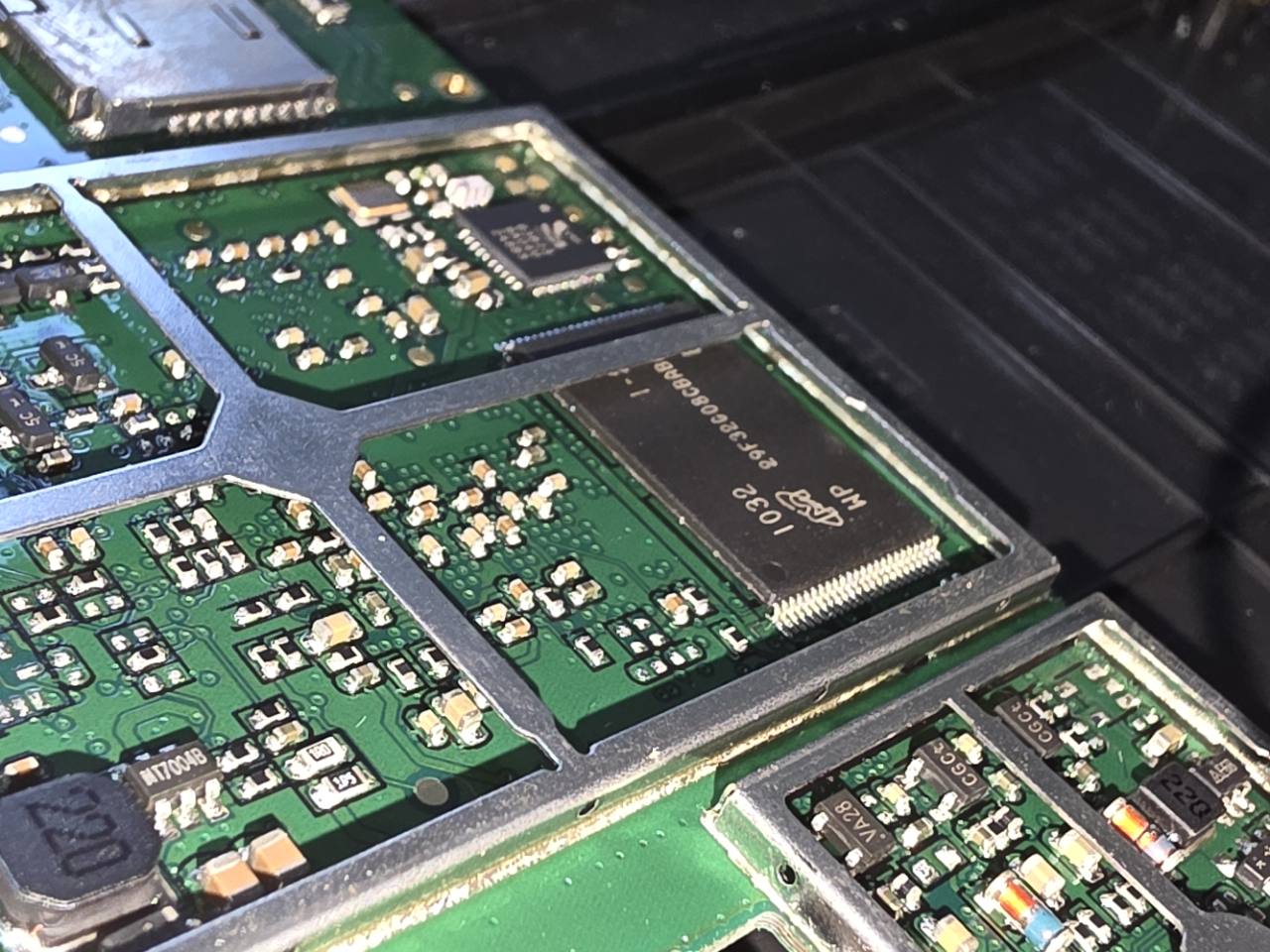
What is feasible now, and what is not yet recoverable
[list]
[*]Custom CE applications: demonstrated on the LCD through RAPI and, in this unit, through the TV tile without PC/card after reboot. The exact shell integration should be kept to a nonessential app slot until restore is tested.
[*]Alternate CE shell: technically plausible as an application running atop the current kernel/drivers, but no replacement of `YFLoad6_Custom.exe`, registry startup or navigation EXE has been attempted. A safe shell design would first need an independently launchable executable and a proven way back to the OEM UI.
[*]Full CE firmware or Linux replacement: not demonstrated. Neither an exact PF09R BSP, verified bootloader entry/recovery mode, raw NAND/OOB image nor board-specific driver set has been obtained. A family-level SiRFatlasV guide is no substitute for a verified AT551/PF09R boot trace and pinout. Linux would additionally need board bring-up for RAM, clocks, NAND ECC, LCD/touch, GPS, USB, audio and power. Do not flash another PND's image because its SoC family matches.
[/list]
For recovery today, the available layers are: (1) owner-controlled CE/ActiveSync access while the original OS boots, (2) a hash-verified stock TV executable preserved both on-device and in the private filesystem backup, and (3) no demonstrated recovery below the running OS. The guarded restore script is prepared, but has not been run. No official device-specific firmware package or update procedure has been validated. This is enough to study CE applications carefully; it is not enough to make experimental NAND flashing a reversible activity.
Limits and next questions
No navigation executable, startup registry key, kernel, bootloader or NAND image was changed. There is no verified USB-A EXE launch, SD autorun, bootloader recovery, Linux BSP for this exact board, or complete raw NAND backup. The successful result is a native Windows CE application launched through an existing OEM menu slot. Before anyone experiments with firmware, the recovery path needs much stronger evidence. Particularly useful contributions would be an exact PF09R board/SoC document, a complete NAND order code or ONFI ID, bootloader/update package evidence for this model, and a read-only acquisition method that preserves raw page and OOB data.
Кратко по-русски: На Navitech VR-761T Primo (SiRFatlasV AT551, Windows CE 6.0) удалось запустить собственное ARM-приложение через штатную кнопку TV App. Сначала сделана файловая резервная копия двух доступных разделов и проверены SHA-256. Оригинальный ATV.EXE сохранён как ATV.ORIGINAL.BAK; после перезагрузки устройство запускает навигацию и тестовый GUI без ПК и microSD. На фото отдельно видны DDR2 Micron D9LXN (номинально 128 МиБ) и NAND серии 29F32G08 (32 Гбит); точная ревизия NAND и параметры ECC ещё не подтверждены. Это замена одного приложения, не взлом загрузчика и не полная прошивка. Полный дамп NAND и проверенное восстановление пока отсутствуют.
— BarbaroR4 / TeamOBM
- Подпись автора
Türkiye